Managing HTTP Security Headers
Overview
The WAF can add HTTP security headers to responses served through it. These headers instruct browsers to enforce security policies that help protect your visitors from common attacks. This document explains what is on by default (nothing), which headers you can turn on from your dashboard, which ones we set for you on request, and which ones belong in your application.
What Is On by Default
By default, the WAF adds no security headers. Every header below is opt-in. A freshly provisioned site passes responses through with only the headers your application sets.
Headers You Can Set from Your Dashboard
These are managed on the Content Security page of your WAF dashboard. They require the Advanced plan or above.
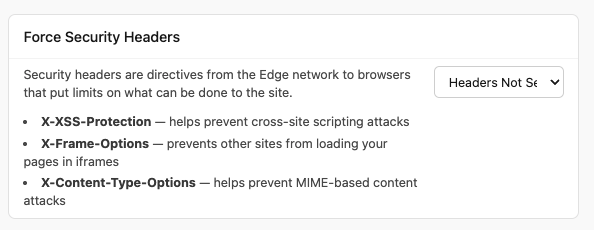
Force Security Headers
One toggle enables three headers together:
- X-XSS-Protection (
1; mode=block) instructs browsers to activate their built-in XSS filter, which can block some reflected cross-site scripting attacks. - X-Frame-Options (
SAMEORIGIN) prevents other sites from loading your pages inside iframes, protecting against clickjacking attacks. - X-Content-Type-Options (
nosniff) prevents browsers from MIME-type sniffing, which can be exploited in content injection attacks.
If you allow other sites to embed your content in iframes, leave this off or set X-Frame-Options in your application instead, since the toggle’s SAMEORIGIN value will block that embedding.
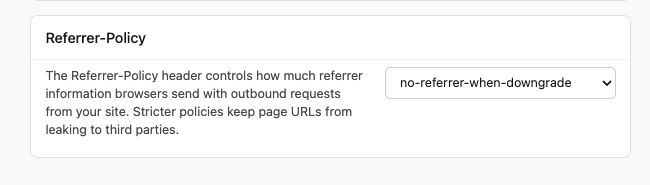
Referrer-Policy
Controls how much referrer information browsers send along with requests leaving your site. Choose any of the standard policy values from the dropdown, or leave it disabled. strict-origin-when-cross-origin is a sensible default for most sites.
Headers We Set for You on Request
Strict-Transport-Security (HSTS)
HSTS tells browsers to always use HTTPS for your domain. You can set it in your application and the WAF will pass it through, or open a support ticket and we will enable it at the edge for you. See Enabling HSTS for the details, including the exact values of the two edge presets and what to check before turning it on.
Headers to Set in Your Application
The WAF has no setting for these. Set them in your application’s responses and the WAF passes them through to visitors unchanged.
| Header | Purpose |
|---|---|
Content-Security-Policy |
Controls which scripts, styles, and other resources browsers will load. See below. |
Permissions-Policy |
Controls which browser features (camera, microphone, geolocation) your site can use. |
How WAF Headers Interact with Application Headers
For any header the WAF is not configured to set, your application’s value passes through unchanged.
If both the WAF and your application set the same header, pick one source and turn the other off. Serving the same security header from two places at once makes behavior hard to reason about, and browsers vary in how they treat duplicates.
Content Security Policy (CSP)
The WAF does not set a Content Security Policy header. CSP is highly application-specific, since it depends on which scripts, styles, fonts, images, and other resources your application loads, so it must be configured in your application.
Setting CSP in Your Application
Add a Content-Security-Policy header in your application’s responses. Most web frameworks provide middleware or configuration for this:
- Rails: Use the
content_security_policyconfiguration in an initializer - Express/Node: Use the
helmetmiddleware with CSP options - Django: Use the
django-csppackage
CSP and the WAF
The WAF passes your application’s CSP header through to visitors without modification. There are no conflicts between the WAF and application-level CSP headers.
One thing to check: if you use report-uri or report-to directives, CSP violation reports from visitors’ browsers will be sent to whatever endpoint you configure. These requests pass through the WAF like any other request, so make sure the reporting endpoint is not blocked by WAF rules.
Need Help?
If you have questions about security headers or how the WAF interacts with your application’s headers:
- Contact us at support@expeditedsecurity.com
- Book a Call at https://app.harmonizely.com/expedited/30-min